Revisiting Flip Bits and Porting To The MC-10

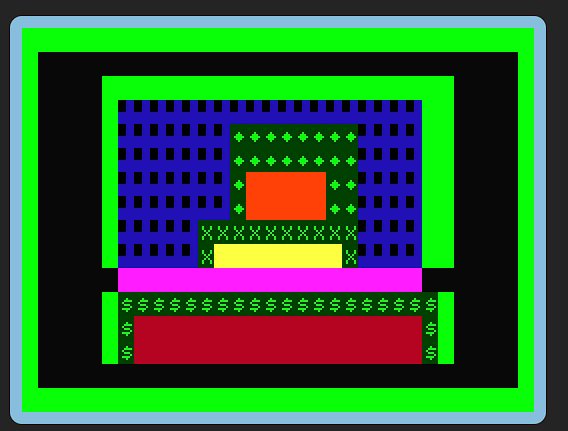
 Last year, I had fun writing a version of the Flipping Bits Game (from the Rosetta Code site) from scratch. It's a nice relaxed puzzle especially if you are into binary. Recently whilst browsing through my retro code, I realised this game would only require minor changes to port to the MC-10.

So I made the changes rather quickly and then found a bug. Levels 1 to 9 are hand coded whereas later levels are randomly generated (though always solvable). Thankfully the fix was easy enough and, yes, I remembered to fix the Dragon/Tandy version too!

The downside of the game is a little slow in places - PLEASE WAIT pops up between every move. It has to check the entire 2D array after each move against the solution. Luckily the MC-10 has an excellent BASIC compiler. I ran it through that and it is now almost instant in response. It really cool to get that speed boost! This makes me very excited for the various tools being created at the moment for the Tandy and the Dragon. Hopefully more people will be able to code that BASIC game they always wanted to.

Have some flipping fun! Here's the MC-10 version - C10 file in the media folder.

New Game Lucky Egg

 First post in quite a while. Not much time for retro so far this year!

Anyway, I started off playing with GET/PUT on the Dragon which allows you copy chunks of GFX around. The Dragon has no built-in sprites so this is the next best thing. There's quite a few optimisations and tricks you can use so keep things fast so I thought it would be fun to break away from SG4 (Text screen) for a while.

I chose PMODE0 which is the lowest of the high resolution GFX modes where 1byte = 8 pixels. I used POKE to create a stick man 8 pixels high on the screen. GET and PUT for such a small character is pretty fast. I added some movement controls and stick man was soon running about. The idea of catching something came to mind so why not eggs? It was much easier than expected to get a fast action game written in BASIC - albeit a very simple one.

After all that, it was just a case of tidying up and adding some polish like a title screen and a high score.

It is going to be interesting to try other modes and see how it affects the speed. There's definitely some spare cycles in the game and we have not even used the speed up poke or other tricks. It's better than a lot of type-ins I've tried - no flickering and it's fast. They often use PMODE4 which is probably too high resolution for most simple type-in games.

As always, the source is available on GitHub. Have fun! Watch out for another stick man game coming soon...

Magic Mirror On The Screen

Well this doesn't need much explanation either... mirroring. Again the buttons aren't amazing but are functional. 

The code is on GitHub if you want to follow along with the code. The WIP output will appear here. Thanks for reading!


We Are Scrolling

Well this doesn't need much explanation... scrolling. May change the buttons but they will do for now. 

Time for some mirroring next!

The code is on GitHub if you want to follow along with the code. The WIP output will appear here. Thanks for reading.

Oops and The Grid

Oops I hadn't noticed the auto-deployed build was broken for a while. Some boring filename casing stuff was breaking the deploy. Sorted now!

Added a toggle for the grid (which was mostly in place already). Demo gif below:

Time for some scrolling next!

The code is on GitHub if you want to follow along with the code. The WIP output will appear here. Thanks for reading.


Export The Screen

It's been ages since I posted here - sorry! I got distracted with some type-ins (videos soon) and life stuff. Since my last blog post a CLS dialog and the export dialog have been added.

 Anyway we now have a working export dialog. There's at least two more export types I want to add but some other features have priority. 5 days of SepTandy to go - we will have a final push!


The code is on GitHub if you want to follow along with the code. The WIP output will appear here. Thanks for reading.

Screen Time

 Time to add in the screen! Luckily the canvas version from the previous React version was pretty well component-ised. Main changes were due to state update (storing the character). Left and Right Mouse buttons can now draw on the screen at it remembers.

Progress is going fast on this version of SGEdit - might need something else to keep me busy for SeptTandy! Next time, I think I will fix the screen layout and add another toolbar.

The code is on GitHub if you want to follow along with the code. The WIP output will appear here. Thanks for reading.


Characters and State

One of the good points of my previous React version of SGEdit was the Character Set. Instead of having 200+ image files to load, I encoded them into base64 and they are just a Javascript array now. This meant it was fairly easy to get the characters on screen in a palette of blocky goodness.


Once that was done, I wanted to add a primary and secondary character (left and right mouse buttons) which required me to store the state for the app. Previously I used Redux which is fine but rather clunky so I searched around for something new and found HookState which requires much less boilerplate code. Yay!

The code is on GitHub if you want to follow along with the code. The WIP output will appear here. Thanks for reading.


SepTandy 2023 - SGEDIT in React

It's very nearly September so time to start thinking about SepTandy for 2023!

I had a few ideas but settled on and update to SGEdit. I have quite a few ideas on what to do. There's some new features I want to add, but I decided to start by picking up an abandoned rewrite of the app in React. To see what state it's in, I tried to get it running tonight but breaking changes in the JS web stack prevented that.

So initial plan is to rebuild it from scratch from an empty app. The unfinished React version was more ambitious with plans for more screen modes. This time around I'd like to focus it back onto the classic 32 by 16 screen with easy to use outputs. Once I am happy with that, I'll maybe consider other fancier stuff. 

I will update GitHub as I go if you want to follow along with the code. The WIP output will appear here. Should be fun! Hope you can come along for the ride.


Let's Go Racing with 7 Lines of Code

 My recent type-in Death Valley is a favourite of mine. Games like it efficiently use the text screen auto-scrolling to great a fast action game in just a short bit of code. I thought it would be fun to write such a game from scratch and getting it going on the Dragon and the BBC.

It only takes a few lines, and with just minor changes it runs on the BBC too. With 40 columns rather than 32, the Beeb is slightly easier to get a higher score.

The Dragon version will, of course, run on the Coco but not the MC-10 which sadly lacks the STRING$ function and ELSE.


BBC Basic

10 L=0:R=39:D=16:S=0:CLS
20 PRINT STRING$(L+1,"X") + STRING$(D-(L+1)," ")+ "V"+ STRING$(R-(D+1)," ")+STRING$(40-(R),"X");
30 A$=INKEY$(0):IFA$="Q"THEND=D-1:IF D<1 THEN D=1
40 IFA$="P"THEN D=D+1:IF D>38 THEN D=38
50 IFRND(10)=1THEN L=L+1 
60 IFRND(10)=1THEN R=R-1
70 S=S+1:IFD=L OR D=R THEN CLS:PRINT "CRASH!!":PRINT "SCORE:":PRINT S:STOP ELSE GOTO 20

Dragon / Tandy Coco

10 L=0:R=31:D=16:S=0:CLS
20 PRINT STRING$(L+1,"X") + STRING$(D-(L+1)," ")+ "V"+ STRING$(R-(D+1)," ")+STRING$(32-(R),"X");
30 A$=INKEY$:IFA$="Q"THEND=D-1:IF D<1 THEN D=1
40 IFA$="P"THEN D=D+1:IF D>30 THEN D=30
50 IFRND(10)=1THEN L=L+1 
60 IFRND(10)=1THEN R=R-1
70 S=S+1:IFD=L OR D=R THEN CLS:PRINT "CRASH!!":PRINT "SCORE:":PRINT S:STOP ELSE GOTO 20

Might see if I can get this one running on other systems! Drive safely now...

Retro Redux - Or Just Getting Myself Organised

 I was quite keen to do some retro coding this year but I put it off as something was stressing me. My retro projects, while fun, were very poorly organised. This site here, some stuff on GitLab, some stuff on GitHub and finished things not put out there for community. So I would avoid doing anything and pick up another hobby.


Anyway I decided to have a go at organising everything, one program at a time and do new things too. Starting with the MC-10, I have picked up some type-ins and ported/expanded/updated my 10 Liners.

The latest stuff is appearing at daftspaniel/RetroCornerRedux: A Misc Retro Cornucopia - Dragon Tandy 8bit biased (github.com) Everything is being updated/refined as I move it in there and organised in a consistent manner with a screenshot and readme file. It's pleasing to see it come together already.

All my (formerly) 10 Liners are now on the MC-10. Gameplay videos below - more type-ins and new stuff to follow. Enjoy!


Glutton - Eat The Matrix

Glutton is a puzzle game based on the game Greed . When I first read the description, I wasn't convinced it was even much of a game. I c...